前回のブログで、「Googleマップに表示される写真や動画の順番は、Google独自のアルゴリズムによって自動的に決められます。」と書きました。
実は、Googleマップに動画を掲載した場合、サムネイルもアルゴリズムによって自動で決められてしまいます。
もし、サムネイル画像を作成して動画の最初に置いたとしても、動画の中の別のワンカットをサムネイルとして認識することが多いようです。
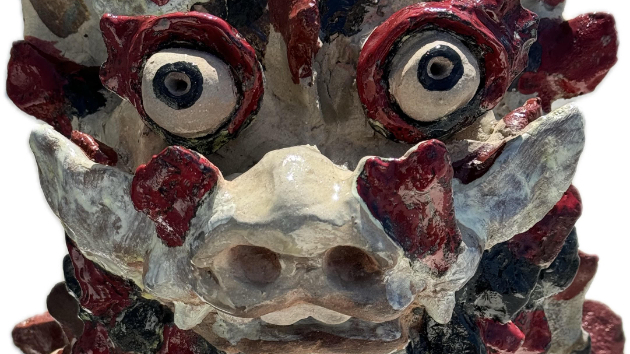
昨年、瀬長島の動画をアップロードした際に、瀬長島の名物”カニ”と「瀬長島」の文字をデコレートし、どう見てもサムネイル画像に見えるものを作って冒頭においてみたのですが...............ダメでした。始まって7秒ほどの 文字も何も入っていない”シーサー”を、アルゴリズムはサムネイルとしてチョイスしてしまいました。
何度か試してみて、ほとんどの場合 私の目論見ははずれ、サムネイルとしてそのまま認識されたものはわずかでした...........
とは言うものの、一般ユーザーにとってもお店のオーナーにとっても、画像に混じって動画が表示される時には映像が動いているので、サムネイルはあまり関係ありません。
サムネイルが目に入るのは、Googleビジネスプロフィールの管理画面でオーナーが動画を確認する場合や、一般ユーザーが「プロフィール」から画像の一覧を表示させる時ですね。
基本的には静止画のサムネイルとして一覧表示されますので。
YouTubeに掲載するためのサムネイルは、質問コーナーにもある通り、無料でお作りしますよ。
サムネイル画像をお付けすることによって追加料金が発生する事はありません!
In my previous blog post, I wrote that "The order in which photos and videos appear on Google Maps is automatically determined by Google's own algorithm."
In fact, when you post a video on Google Maps, the thumbnail is also automatically determined by the algorithm.
Even if you create a thumbnail image and place it at the beginning of your video, it seems that the system will often recognize a different shot from within the video as the thumbnail.
Last year, when I uploaded a video of Senaga Island, I decorated it with Senaga Island's specialty "crab" and the words "Senaga Island," creating something that looked like a thumbnail and placed it at the beginning...but it didn't work. The algorithm chose a "shisa" lion statue about seven seconds into the video, with no text or anything on it, as the thumbnail.
After trying several times, I found that in most cases my prediction was wrong, and only a few were recognized as thumbnails as they were...
That said, for both average users and shop owners, the video is moving when it's displayed among images, so the thumbnail doesn't really matter.
Thumbnails are seen when the owner checks videos on the admin screen of their Google Business Profile, and when general users view a list of images from "Profile."
They are basically displayed in a list as still image thumbnails.
As mentioned in the FAQ section, we will create thumbnails for posting on YouTube for free.
There is no additional charge for adding thumbnail images!