As defined as "data structure + algorithm = program", they are closely related
to each other. If you use the right data structure for your processing, you will
make a good program.
Basic data structure
I will introduce the basic data structures prepared in most programming
languages.
①Basic data type
This is a data type that stores a single underlying piece of data.
Let me give you some examples.
・Integer type:Only be assigned integer values.
・Real numeric type:Only be assigned integers and decimals.
・Character type:Only be assigned characters.
・Boolean type:Only be assigned one of two, true and false.
・Structure type:Handle multiple variables together.
②Array type
This is a data structure that collects multiple pieces of data of the same data
type. You use subscripts to specify arbitrary data in the array.
■What is a one-dimensional array?
As shown in the figure above, it is called the one-dimensional array that you
specify arbitrary data in an array by a single subscript.
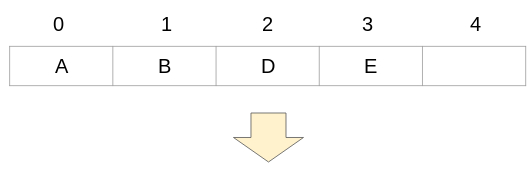
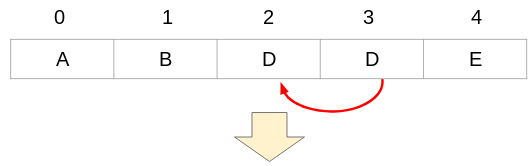
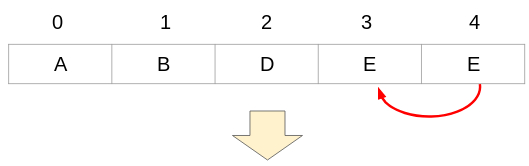
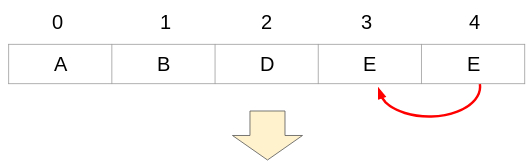
・In case of adding data
For example, if you add the data "C" to subscript 2 in the array below, it is
as follows.
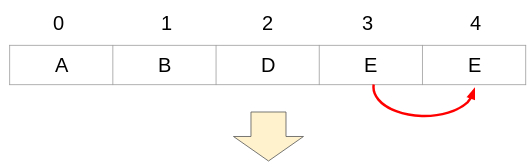
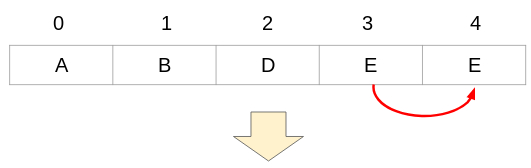
Copy the data in subscript 3 to subscript 4.
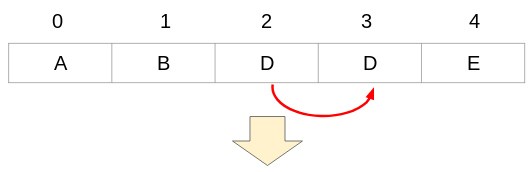
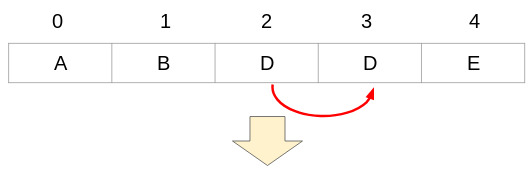
Copy the data in subscript 2 to subscript 3.
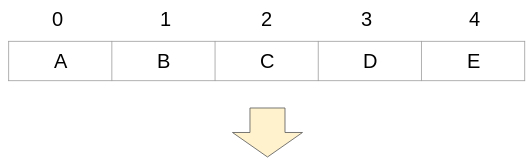
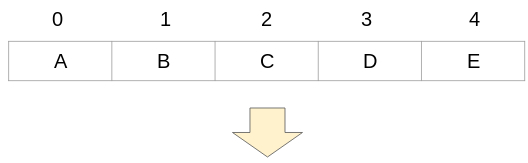
Store the data "C" in subscript 2.
You can store the data C without the data A, B, D, and E originally stored in
the array disappearing.
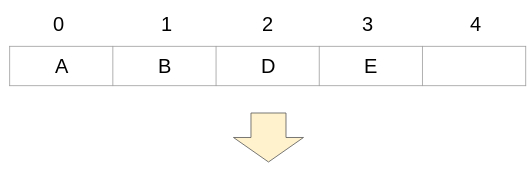
・In case of deleting data
For example, if you delete the data "C" to subscript 2 in the array below, it is
as follows.
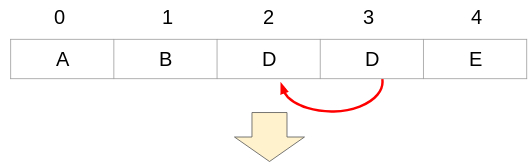
Copy the data in subscript 3 to subscript 2.
Copy the data in subscript 4 to subscript 3.
Delete the data in subscript 4.
By doing this, you can pack and store data without creating space in the
middle of the array.
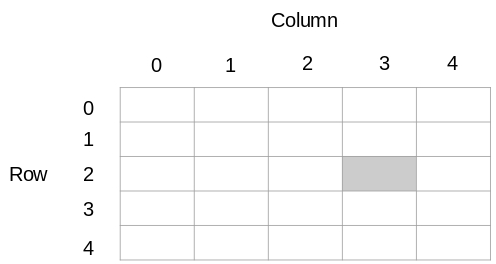
■What is a two-dimensional array?
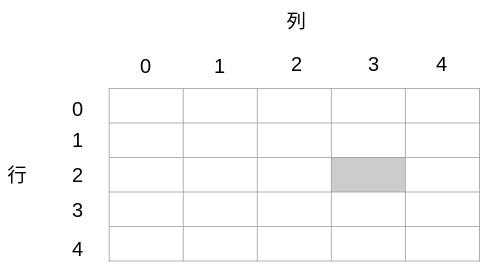
A two-dimensional array, also called a matrix or table, is represented by a
row ✕ column rectangle. The position of each data in the matrix is specified
by two subscripts.
For example, if the array name is A, it will be as follows.
If you specify the gray position in the two-dimensional array in the above
figure, you describe A(2, 3) or A[2][3]. The format differs depending on
the programming language.
[Japanese]
「データ構造+アルゴリズム=プログラム」と定義されるように、それぞれが密接な関係にあります。処理に応じて適切なデータ構造を用いることが、良いプログラムを作ることに繋がります。
基本データ構造
ほとんどのプログラム言語に予め用意されており、基本となるデータ構造を
紹介します。
①基本データ型
基本データ型は、基本となる単一のデータを格納するためのデータ型です。
一例を挙げると
・整数型:整数値のみ代入できるデータ型です。
・実数型:実数(整数や小数など)のみ代入できるデータ型です。
・文字型:文字のみ代入できるデータ型です。
・論理型:trueとfalseの2つのうち1つを代入できるデータ型です。
・構造体型:複数の変数をまとめて扱うデータ型です。
などがあります。
②配列型
配列型は、同じデータ型のデータを複数個集めたデータ構造です。配列内の
任意のデータを指定するには、添字を利用します。
■一次元配列とは?
上図のように、1つの添字によって配列内の任意のデータを指定するデータ
構造を、一次元配列といいます。
・データの追加
(例)下記の配列の添字2にデータ「C」を追加する場合
添字3にあるデータ「E」を、データが空の添字4にコピーします。
添字2にあるデータ「D」を、添字3にコピーします。
データ「C」を添字2に格納します。
こうすることで、最初に配列に格納されていたデータA、B、D、Eが消える
(上書きされる)ことなく、データCを格納できます。
・データの削除
(例)下記の配列の添字2にあるデータ「C」を削除する場合
添字3のデータ「D」を、添字2にコピーします。
添字4のデータ「E」を、添字3にコピーします。
添字4のデータ「E」を削除します。
こうすることで、配列の途中に空きを作らずに、データを詰めて格納できます。
■二次元配列とは?
二次元配列は行列または表ともいい、行✕列の長方形で表現します。行列内の各データの位置は、2つの添字で指定します。
(例)配列名をAとした場合
上図の二次元配列で灰色の位置を指定するには、
A(2, 3) または A[2][3]
のように指定します。プログラミング言語によって異なります。