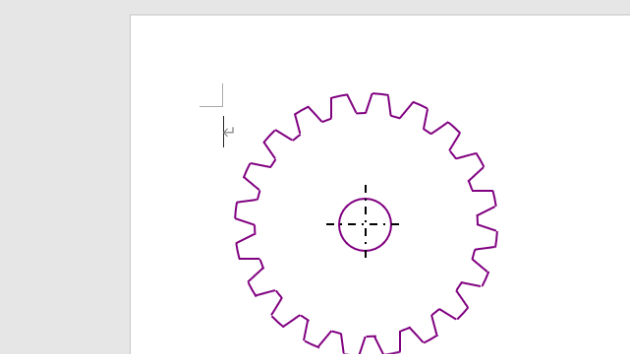
Option Explicit
Option Base 0
Public Sub 歯車描画マクロ()
Const GEARXPOS = 180 '歯車中心位置 X
Const GEARYPOS = 160 ' Y
Const GEARRADI = 100 '歯車の半径
Const GEARCONT = 20 '歯車の歯数
Const GEARHEIG = 15 '歯車の歯の高さ
Const GEARTOPP = 0.7 '歯の頭部比率
Const GEARDIVI = 3 '歯面の傾き
Const GEARLNWT = 1.5 '描画線の太さ
Const GEARHORA = 20 '歯車の穴の半径
'----------------------------------------------------------------------
Dim Ip As Integer, intAng As Integer, dblRd As Double
Dim intXp(1) As Integer, intYp(1) As Integer, intAg(2) As Integer
Dim lngCl As Long
'
dblRd = (4 * Atn(1)) / 180
lngCl = RGB(128, 0, 128) '←描画線色
intAng = 360 \ GEARCONT
For Ip = 0 To GEARCONT - 1
intAg(0) = intAng * Ip:
intAg(1) = intAg(0) +CInt(intAng * GEARTOPP)
intAg(2) = intAg(0) + intAng
'///山の部分の円弧
With ActiveDocument.Shapes.AddShape(msoShapeArc, _
GEARXPOS - GEARRADI, GEARYPOS - GEARRADI, _
GEARRADI * 2, GEARRADI * 2)
'
.Line.Visible = True
.Line.ForeColor.RGB = lngCl '←線色
.Line.Weight = GEARLNWT '←線の太さ
'
.Adjustments(1) = (intAg(0) + GEARDIVI)
.Adjustments(2) = (intAg(1) - GEARDIVI)
End With
'///谷の部分の円弧
With ActiveDocument.Shapes.AddShape(msoShapeArc, _
GEARXPOS - (GEARRADI - GEARHEIG), _
GEARYPOS - (GEARRADI - GEARHEIG), _
(GEARRADI - GEARHEIG) * 2, _
(GEARRADI - GEARHEIG) * 2)
'
.Line.Visible = True
.Line.ForeColor.RGB = lngCl '←線色
.Line.Weight = GEARLNWT '←線の太さ
'
.Adjustments(1) = (intAg(1) - 0)
.Adjustments(2) = intAg(2)
End With
'///左斜面
intXp(0) = GEARRADI * Cos(dblRd * (intAg(1) - GEARDIVI)) _
+ GEARXPOS
intYp(0) = GEARRADI * Sin(dblRd * (intAg(1) - GEARDIVI)) _
+ GEARYPOS
intXp(1) = (GEARRADI - GEARHEIG) * Cos(dblRd * (intAg(1))) _
+ GEARXPOS
intYp(1) = (GEARRADI - GEARHEIG) * Sin(dblRd * (intAg(1))) _
+ GEARYPOS
With ActiveDocument.Shapes.AddLine(intXp(0), intYp(0), _
intXp(1), intYp(1)).Line
.ForeColor.RGB = lngCl '←線色
.Weight = GEARLNWT '←線の太さ
.DashStyle = msoLineSolid '←線のスタイル
End With
'///右斜面
intXp(0) = GEARRADI * Cos(dblRd * (intAg(2) + GEARDIVI)) _
+ GEARXPOS
intYp(0) = GEARRADI * Sin(dblRd * (intAg(2) + GEARDIVI)) _
+ GEARYPOS
intXp(1) = (GEARRADI - GEARHEIG) * Cos(dblRd * (intAg(2))) _
+ GEARXPOS
intYp(1) = (GEARRADI - GEARHEIG) * Sin(dblRd * (intAg(2))) _
+ GEARYPOS
With ActiveDocument.Shapes.AddLine(intXp(0), intYp(0), _
intXp(1), intYp(1)).Line
.ForeColor.RGB = lngCl '←線色
.Weight = GEARLNWT '←線の太さ
.DashStyle = msoLineSolid '←線のスタイル
End With
Next Ip
'///シャフト穴
With ActiveDocument.Shapes.AddShape(msoShapeOval, _
GEARXPOS - GEARHORA, GEARYPOS - GEARHORA, _
GEARHORA * 2, GEARHORA * 2)
.Fill.Visible = False
.Line.ForeColor.RGB = lngCl '←線色
.Line.Weight = GEARLNWT '←線の太さ
.Line.Visible = True
End With
'///中心線
Ip = (GEARHORA * 3) \ 2
With ActiveDocument.Shapes.AddLine(GEARXPOS - Ip, _
GEARYPOS, GEARXPOS + Ip, GEARYPOS).Line
.ForeColor.RGB = RGB(0, 0, 0) '←線色
.Weight = GEARLNWT '←線の太さ
.DashStyle = msoLineDashDot '←線のスタイル
End With
With ActiveDocument.Shapes.AddLine(GEARXPOS, _
GEARYPOS - Ip, GEARXPOS, GEARYPOS + Ip).Line
.ForeColor.RGB = RGB(0, 0, 0) '←線色
.Weight = GEARLNWT '←線の太さ
.DashStyle = msoLineDashDot '←線のスタイル
End With
End Sub
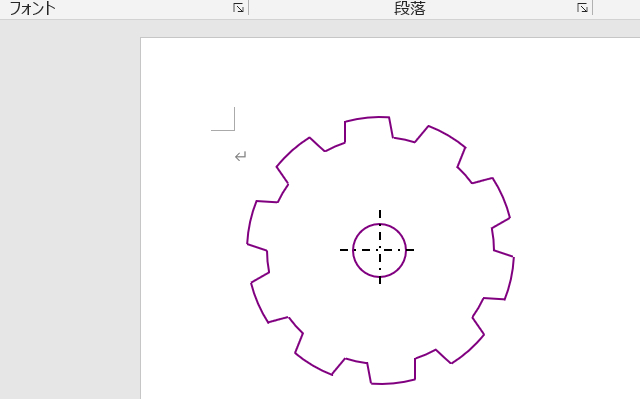
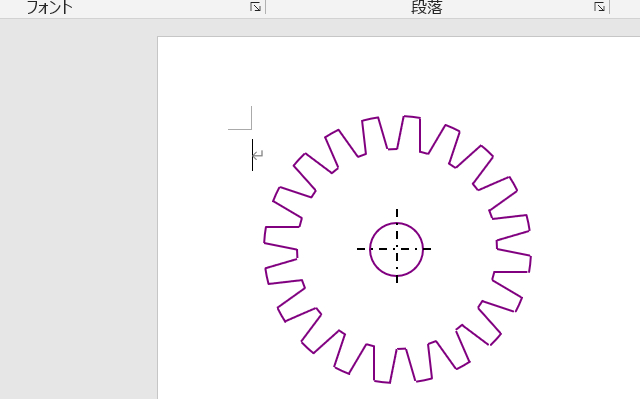
Const GEARCONT = 10 '歯車の歯数
Const GEARHEIG = 25 '歯車の歯の高さ
蛇足: 筆者は福井高専機械工学科卒ですが、学生時代、機械製図は大の苦手でした。