String manipulation algorithm
The data you can use on your computer includes not only numerical
data but also character data. There are various types of characters
such as alphabets, symbols, hiragana, katakana, and kanji.
A collection of multiple characters is called a character string.
For example, it becomes the string "PROGRAM" by collecting
the 7 letters "P", "R", "O", "G", "R", "A", and "M". Therefore,
you can think of a string as a "table (array) that contains one
character for each element."
In the Fundamental Information Technology Engineer Examination,
there may be questions of exam such as counting the frequency
of appearance of characters and checking whether the specified
character string is included. Let's look at the algorithm with the
example below.
(Example)An algorithm that searches for a pattern character
string(= array "PTN") in text (= array "TEXT") and displays its position.
Condition 1:The lengths of the text and the pattern character
string are m and n, respectively.
Condition 2:If a pattern character string is found in the text,
the start position is displayed.
Condition 3:Subscripts for arrays "TEXT" and "PTN" start from 0.
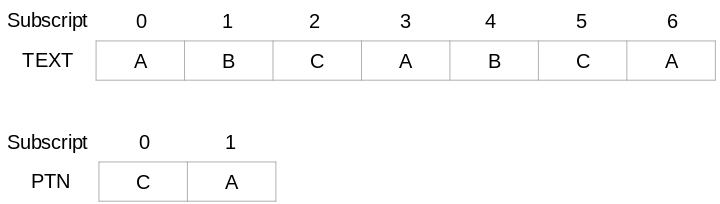
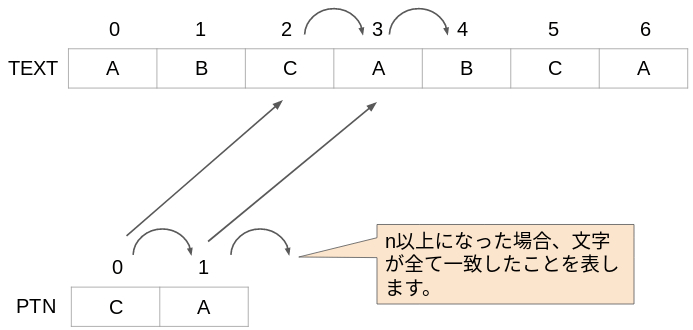
The array "TEXT" and the array "PTN" are imaged as follows,
for example.
In this example, the text length is m = 7 and the pattern string
length is n = 2. If you search for the string CA in the ABCABCA
string, you will find two places. Therefore, the C subscripts "2"
and "5" will be displayed from each CA. This algorithm is as follows.
【Algorithm】
①The subscript of the array "TEXT" is 0.
②The following process is repeated.
②-1. If "TEXT subscript > m - n", stop repeating.
②-2. The subscript of the array "PTN" is 0.
②-3. Make the subscript to be investigated the same as
the subscript of "TEXT".
②-4. The following process is repeated.
②-4-1. If "PTN subscript ≧ n" or
"TEXT [subscript to be investigated] and PTN [subscript]
do not match", stop repeating.
If not, add +1 to the PTN subscript and +1 to
the subscript to be investigated to see if the
next character matches.
②-5. If the "PTN" subscript is not less than n, the array "PTN"
is found and the "TEXT" subscript is displayed.
②-6. Add +1 to the "TEXT" subscript.
I will explain the above algorithm.
First of all, about ②-1. "TEXT subscript > m - n".
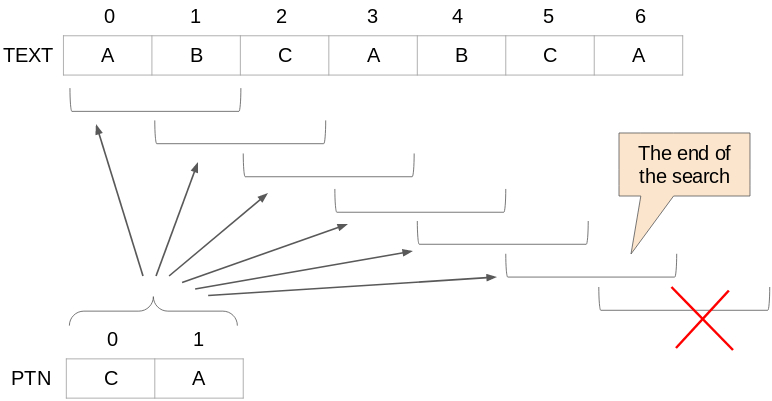
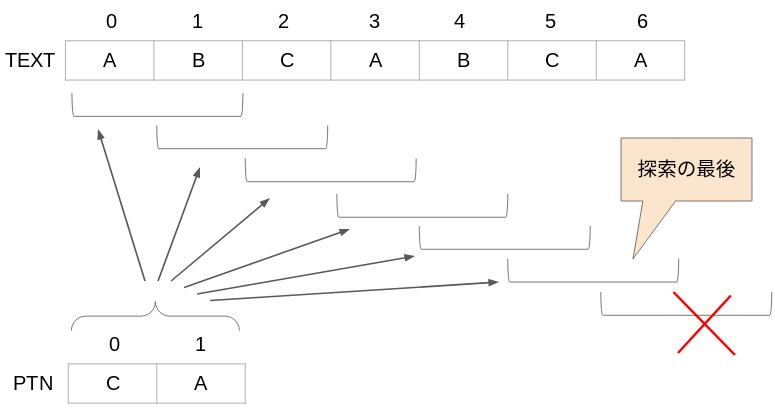
This algorithm searches for a pattern string as shown below.
You cannot search beyond the last element of the
array "TEXT"(subscript 6). Therefore, the last position to
search is 7 - 2 = 5.(m - n) In short, it will search for a pattern
string while the "TEXT" subscript is no more than m - n (5 or less).
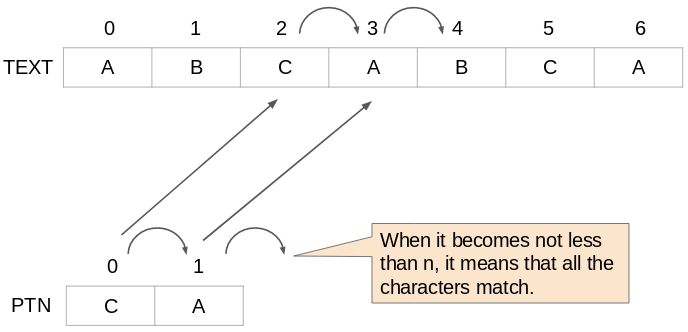
Next is about ②-4-1. This is the part that determines whether
to continue to check character by character for matching
with the pattern string. If the subscript of PTN is not less than n,
it means that all the pattern strings match, so stop repeating.
Also, all characters in the pattern string must match. If the
characters of the array TEXT and the array PTN are different
even by one character, stop repeating ②-4.
Finally, about the case where the "PTN" subscript has
become not less than n. This means that all the pattern
strings match. At this time, the "TEXT" subscript(start position)
is displayed.
This is the end of the string manipulation algorithm.
I have briefly introduced the basics in this month, so I will
provide different contents from next year.
Have a nice year!
[Japanese]
文字列操作のアルゴリズム
コンピュータで利用されるデータには、数値データだけではなく文字データもあります。文字には、アルファベット、記号、平仮名、カタカナ、漢字と様々な種類があり、この文字を複数集めたものを文字列といいます。
例えば、"P"、"R"、"O"、"G"、"R"、"A"、"M"という7文字を集めることで
"PROGRAM"という文字列になります。そのため、文字列は「各要素に 1文字ずつを格納したテーブル(配列)」と考えることができるのです。
基本情報技術者試験では、文字の出現頻度を数える問題や、指定された文字列が含まれるかを調べるなどの問題が出ることがあります。下記の例でアルゴリズムを見てみましょう。
(例)テキスト(= 配列TEXT)の中からパターン文字列(= 配列PTN)を探索し、その位置を表示するアルゴリズム。
条件1:テキスト、パターン文字列の長さは、それぞれ m, n である。
条件2:テキスト中にパターン文字列が見つかった場合、先頭位置を表示する。
条件3:配列TEXT、PTNの添字は、0から始まる。
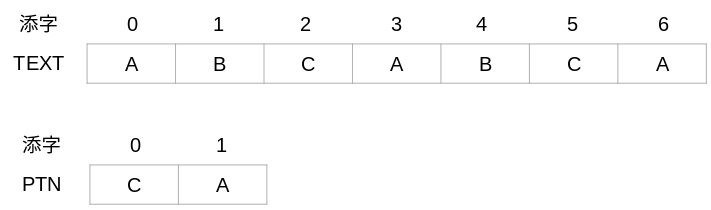
配列TEXTと配列 PTNは、例えば下記のようにイメージします。
この例の場合、テキストの長さは m = 7、パターン文字列の長さは n = 2 になります。ABCABCA の文字列から CA という文字列を探索すると、2か所見つかります。よって、それぞれのCA からCの添字「2」と「5」を表示することになります。このアルゴリズムが下記になります。
【アルゴリズム】
①配列TEXTの添字を0とする。
②下記の処理を繰り返す。
②-1. 「TEXTの添字 > m - n」の場合、繰り返しをやめる。
②-2. 配列PTNの添字を0とする。
②-3. 調査対象の添字を、TEXTの添字と同じにする。
②-4. 次の処理を繰り返す。
②-4-1. 「PTNの添字 ≧ n」または
「TEXT[調査対象の添字] と PTN[添字]の文字が一致しない」
場合は、繰り返しをやめる。
そうでない場合は、PTNの添字を+1し、調査対象の添字も+1
して次の文字が一致するかどうかを調べる。
②-5. PTNの添字が n 以上の場合、配列PTNが見つかったので
TEXTの添字を表示する。
②-6. TEXTの添字を +1 する。
上記のアルゴリズムを解説します。
②-1.の「TEXTの添字 > m - n」についてですが、このアルゴリズムでは下記のようにパターン文字列を探索します。
配列TEXTの最後の要素(添字6)を超えて探索することはできません。そのため、最後に探索する位置は、7 - 2 = 5です。(m - n)
つまり、TEXTの添字が m - n以下(5以下)の間は、パターン文字列があるか探すことになります。
次に②-4-1.についてです。パターン文字列と一致するかを 1文字ずつチェックする繰り返しを続けるかどうか判断する部分です。
PTNの添字がn以上となった場合、パターン文字列は全て一致したことになりますので、繰り返しをやめます。また、パターン文字列の全ての文字が一致しなければいけませんので、配列TEXTと配列PTNの文字が一文字でも違う場合も、②-4の繰り返しをやめます。
最後に、PTNの添字が n 以上になった場合についてです。これはパターン文字列が全て一致したことを表します。このときに、TEXTの添字(先頭位置)を表示します。
文字列操作のアルゴリズムについては、今回はここまでにします。
この1ヶ月で基礎的なことを簡単に紹介してきました。来年からはこれまでとは異なる内容をお届けしようと思います。
それではみなさん、良いお年を!