Search algorithm
In the Fundamental Information Technology Engineer Examination, the
following algorithms tend to be asked.
・Search (linear search, binary search, hashing method, etc.)
・Sort (quick sort, insertion sort, etc.)
・String manipulation (string search, string compression)
This time, I will explain about "Search".
Searching is the process of finding specific data in a collection of data, such
as an array or file. Here are two typical search methods.
(1)Linear search
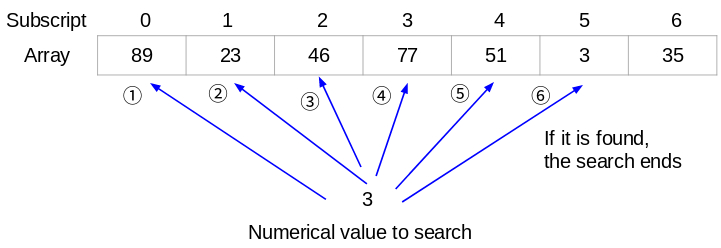
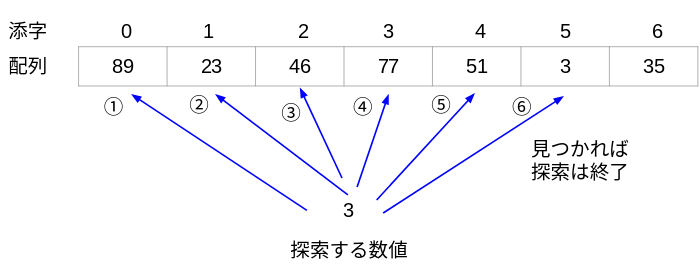
This is a method of searching from the beginning (or end) of the array in order
to search for specific data.
If the data is found, the search is completed. If you search to the end of the
array and do not find it, then there is no data you are looking for in that array.
■Feature
・Advantage
You can search regardless of the order of the data in the table.
(It doesn't have to be in ascending or descending order.)
・Disadvantage
The search is slow. Because the more data in the table, the more
comparisons you make.
Next, let's look at the algorithm of linear search.
This is an algorithm that searches the numerical value of 10 from the array
"ARRAY" in which 50 arbitrary data are already recorded. If 10 is found,
"Found" is displayed, and if not found, "Not found" is displayed.
(① to ⑤ are the order of processing)
【Algorithm】
①The initial value of the subscript is 0.
②The data to be searched is 10.
③Repeat the following processes (③-1 to ③-3).
③-1. When the subscript reaches 50, stop repeating.
③-2. Compare the data to be searched with the data stored in the
ARRAY[subscript]. If they match, stop repeating.
③-3. Add +1 to the subscript.
④If the subscript is less than 50, "Found" is displayed because the data was
found.
⑤If the subscript is 50, "Not found" is displayed because it was not found.
(2)Binary search
Binary search is used when the data in the array to be searched is arranged
in ascending or descending order in advance. Compare with the data in the
center of the array, and find out the large/small relation with the data you
want to search. It is a method to narrow down the search range by
determining whether the data you want to search is in the first half or the
second half of the array.
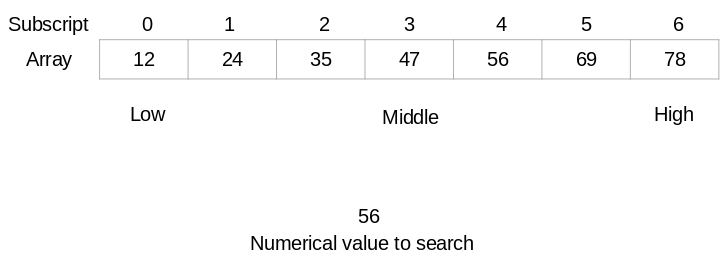
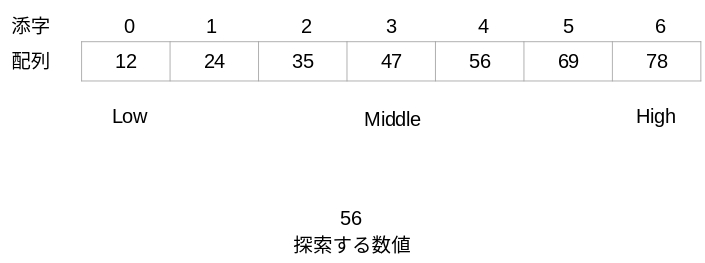
①The lower limit of the search range is Low (the position where the subscript
is 0), and the upper limit is High (the position where the subscript is 6). Add
each subscript to get 0 + 6 = 6, and calculate 6 ÷ 2 to find the center position.
This puts the Middle in the subscript 3 position. Compared to the Array[3],
47 < 56 (value at the Middle position < value to search), so there is no 56
to the left of the Middle position.
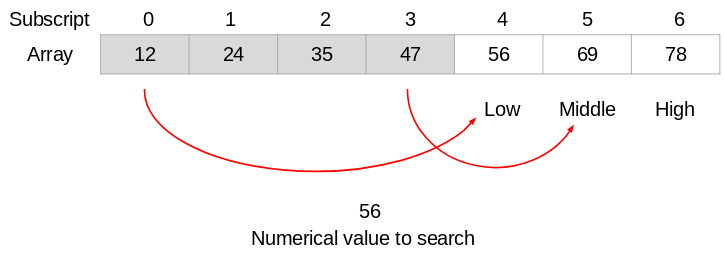
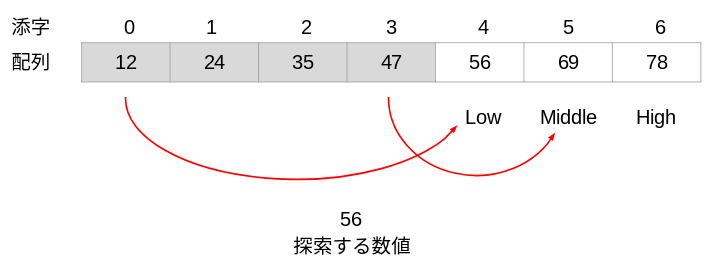
②Move the Low position to the next right position in Middle (the position of
subscript 4). The Middle position is moved to the position of subscript 5 by
calculating (4 + 6) ÷ 2. This narrows the search range to subscripts 4〜6.
Here, compared to the Array[5], 69 > 56
(value at the Middle position > the number to be searched), so there is no 56
to the right of the Middle position.
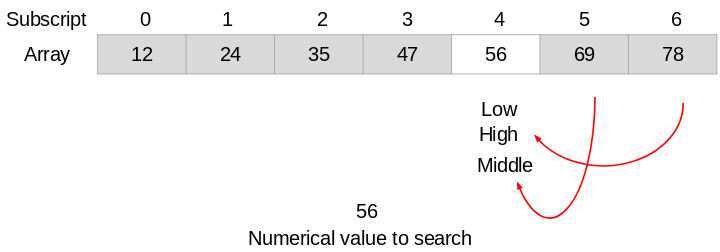
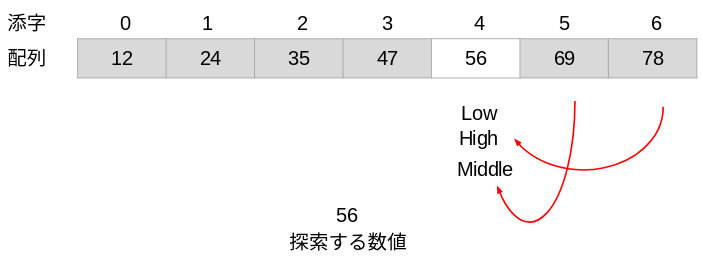
③Move the High position one position to the left of Middle (the position of
subscript 4). The Middle position is moved to the position of subscript 4 by
calculating (4 + 4) ÷ 2. Compared with the Array[4], 56 = 56
(value at the middle position = numerical value to search), and it was found.
■Feature
・Advantage
The search is fast.(The number of comparisons does not change much as
the number of arrays increases.)
・Disadvantage
You cannot search unless the array is in ascending or descending order.
Next, let's look at the binary search algorithm.
This is an algorithm that binary search for the number 56 from an array that
already contains 7 arbitrary data. If 56 is found, "Found" is displayed, and if
not found, "Not found" is displayed. (① to ⑤ are the order of processing)
【Algorithm】
①Set Low to 0.
②Set High to 6.
③The numerical value to be searched is 56.
④Repeat the following processes (④-1 to ④-3).
④-1. Set the value calculated by (Low + High) ÷ 2 to Middle.
④-2. Compare the array[Middle] with the number to search(56).
In the case of "array[Middle] < 56", set Low to Middle + 1.
In the case of "array[Middle] > 56", set High to Middle - 1.
In the case of "array[Middle] = 56", stop repeating.
④-3. In the case of "Low > High", stop repeating.
⑤In the case of "array[Middle] = 56", "Found" is displayed because the
data was found. Otherwise, "Not found" is displayed.
[Japanese]
探索のアルゴリズム
基本情報技術者試験では、
・探索(線形探索、二分探索、ハッシュ法など)
・並べ替え(クイックソート、挿入ソートなど)
・文字列操作(文字列の探索、文字列の圧縮)
などのアルゴリズムが出題される傾向にあります。この中から、今回は
「探索」について解説します。
探索とは、配列やファイルなどのデータの集まりから特定のデータを見つける過程のことです。探索の代表的な方法を2つ紹介します。
(1)線形探索
特定のデータを探索するために、配列の先頭(または末尾)から順番に調べていく方法です。
探索するデータが見つかれば探索終了です。配列の最後まで探索して見つからなければ、その配列には探しているデータは無いということになります。
■線形探索の特徴
・長所
テーブルの要素がどのような並び順であっても探索が可能です。
(昇順や降順に並んでいる必要はありません)
・短所
探索が遅いです。(テーブルの要素が増えると、それに比例して比較回数も
増えるからです)
続いて、線形探索のアルゴリズムを見てみましょう。
(例)50個の任意のデータが既に記録された配列ARRAYから、10という数値を線形探索するアルゴリズム。10が見つかったら"Found"、見つからなかったら"Not found"を表示する。(①〜⑤は処理の順番)
【アルゴリズム】
①添字の初期値は0とする。
②探索するデータは10とする。
③次の処理(③-1 〜 ③-3)を繰り返す。
③-1. 添字が50になった場合は、繰り返しをやめる。
③-2. 探索するデータと、配列ARRAY[添字]に格納されているデータを
比較する。一致したら繰り返しをやめる。
③-3. 添字を+1する。
④添字が50未満の場合、データが見つかったので "Found" を表示する。
⑤添字が50の場合、見つからなかったので "Not found" を表示する。
(2)二分探索
二分探索は、探索対象の配列内のデータが予め昇順または降順に並んでいるときに利用します。配列の中央にあるデータと比較し、検索したいデータとの大小関係を調べます。検索したいデータが配列の前半にあるのか、後半にあるのかを判断して、探索範囲を絞っていく方法です。
①探索範囲の下限をLow(添字が0の位置)、上限をHigh(添字が6の位置)とします。それぞれの添字を足すと0 + 6 = 6になり、6 ÷ 2すれば中央の位置が
分かります。これによって中央のMiddleは添字3の位置になります。配列[3]と比較すると 47 < 56(Middleの位置の値 < 探索する数値)なので、Middleの位置よりも左側に56はありません。
②Lowの位置をMiddleの1つ右の位置(添字4の位置)に移動します。Middleの位置は、(4+6) ÷ 2を計算して添字5の位置に移動します。これにより、探索
範囲は添字4〜6に絞られます。ここで、配列[5]と比較すると 69 > 56
(Middleの位置の値 > 探索する数値)なので、Middleの位置よりも右側に56はありません。
③Highの位置をMiddleの1つ左の位置(添字4の位置)に移動します。Middleの位置は、(4+4) ÷ 2を計算して添字4の位置に移動します。ここで配列[4]と比較すると、56 = 56 (Middleの位置の値 = 探索する数値)となり、探索する数値が見つかりました。
■二分探索の特徴
・長所
探索が速いです。
(配列の要素数が増えても比較回数はあまり変わらないです)
・短所
配列が昇順または降順でなければ探索できません。
続いて、二分探索のアルゴリズムを見てみましょう。
(例)7個の任意のデータが既に記録された配列から、56という数値を二分探索するアルゴリズム。56が見つかったら "Found" 、見つからなかったら
"Not found" を表示する。(①〜⑤は処理の順番)
【アルゴリズム】
①Lowを0とする。
②Highを6とする。
③探索する数値を56とする。
④次の処理(④-1 〜 ④-3)を繰り返す。
④-1. Middleを、(Low + High)÷2で計算した値とする。
④-2. 配列[Middle]と、探索する数値を比較する。
「配列[Middle] < 探索する数値」の場合は、LowをMiddle + 1とする。
「配列[Middle] > 探索する数値」の場合は、HighをMiddle - 1とする。
「配列[Middle] = 探索する数値」の場合は、繰り返しをやめる。
④-3. LowがHighよりも大きくなった場合は、繰り返しをやめる。
⑤「配列[Middle] = 探索する数値」の場合は、"Found" を表示する。
そうでない場合は、"Not found" を表示する。