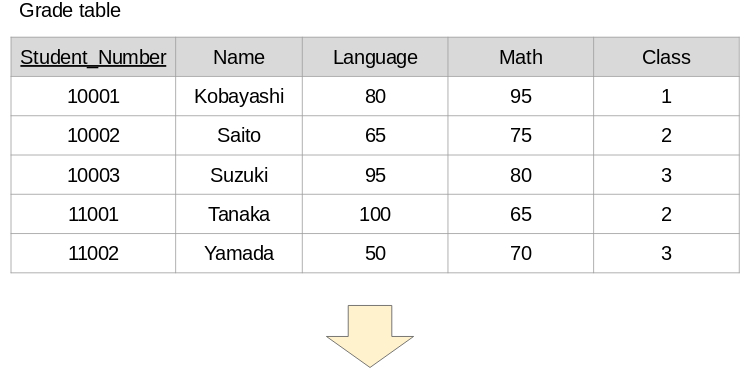
I describe the SQL when you insert, update, and delete the data in a table on
the database.
(1)Insert
If you want to insert the data into a table, use "INSERT" in the SQL.
The SQL is as follows.
INSERT INTO TableName(Item, Item, ・・・)
VALUES(Data, Data, ・・・)
After the table name, describe all the items of the table you want to register.
Be sure to describe the primary key.
After "VALUES", describe the data you want to register. Also here, be sure to
describe the data you want to register in the primary key.
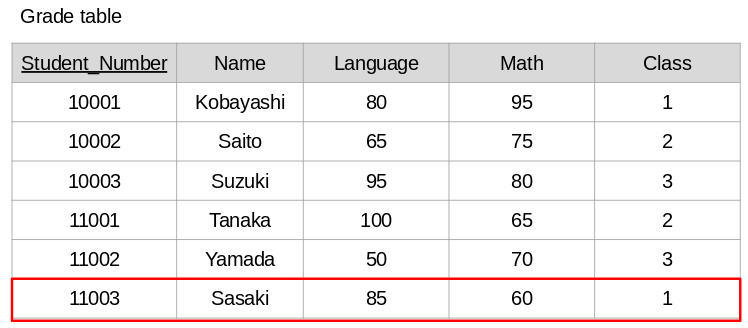
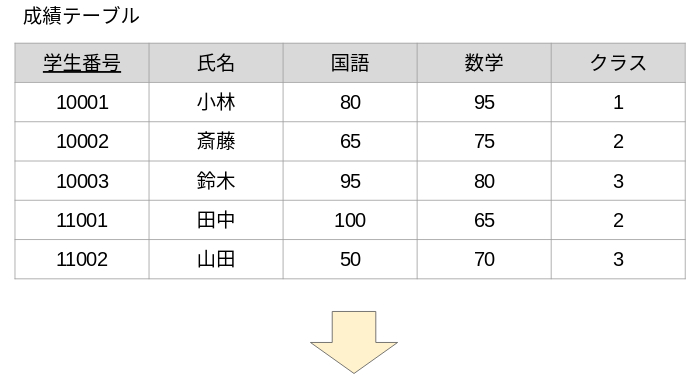
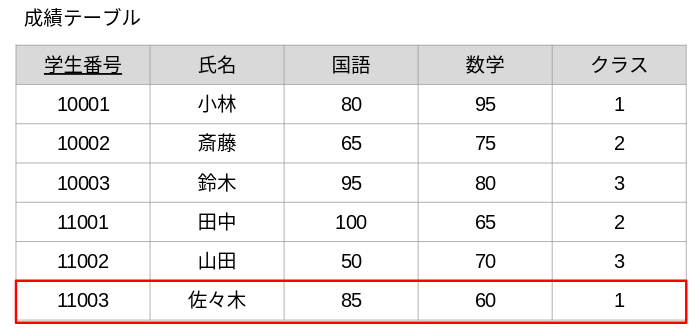
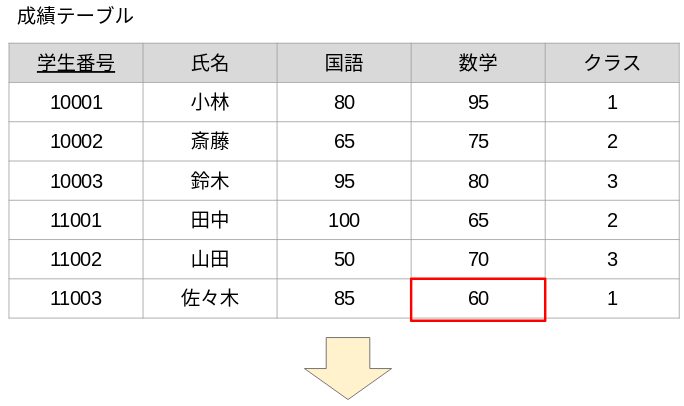
For example, the SQL for registering a student with student number 11003 in
the "Grade" table is as follows.
INSERT INTO Grade(Student_Number, Name, Language, Math, Class)
VALUES('11003', 'Sasaki', 85, 60, 1)
※ Student numbers and names are CHAR type. Therefore, you must enclose
them in single quotes when you write them after "VALUES".
On the other hand, Language and Math are DECIMAL type, so there is no
need to enclose them in single quotes.
(2)Update
If you want to update the data in a table, use "UPDATE" in the SQL.
The SQL is as follows.
UPDATE TableName
SET Item = Data, Item = Data, ・・・
WHERE Conditions
You will update the items in the rows that match the conditions specified in
"WHERE". It is also possible to update multiple items. If "WHERE" is not
described, all rows in the table will be updated.
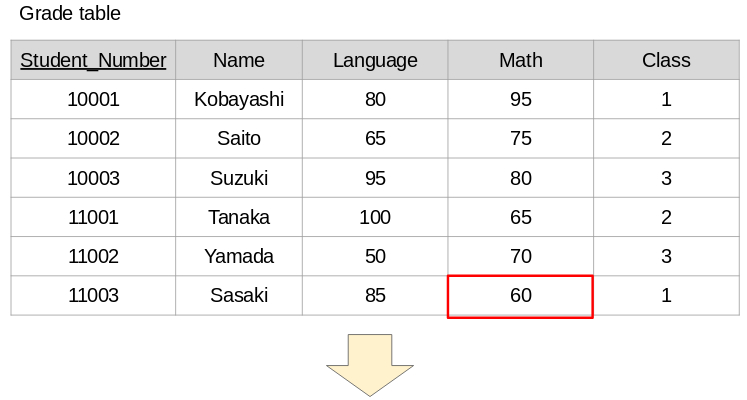
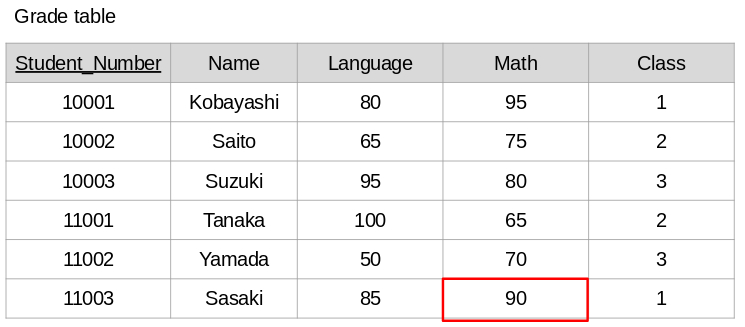
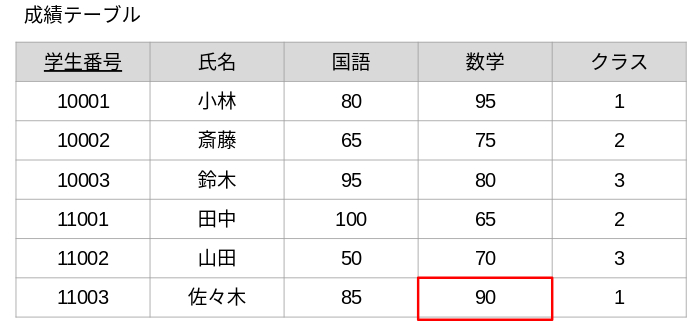
For example, the SQL for updating the math score of a student with student
number 11003 in the "Grade" table to 90 points is as follows.
UPDATE Grade SET Math = 90 WHERE Student_Number = '11003'
(3)Delete
If you want to delete the rows in a table, use "DELETE" in the SQL.
The SQL is as follows.
DELETE FROM TableName WHERE Conditions
You will delete the rows that match the conditions specified in "WHERE".
If you don't write a "WHERE", all rows in the table will be deleted. Please be
careful not to accidentally delete all.
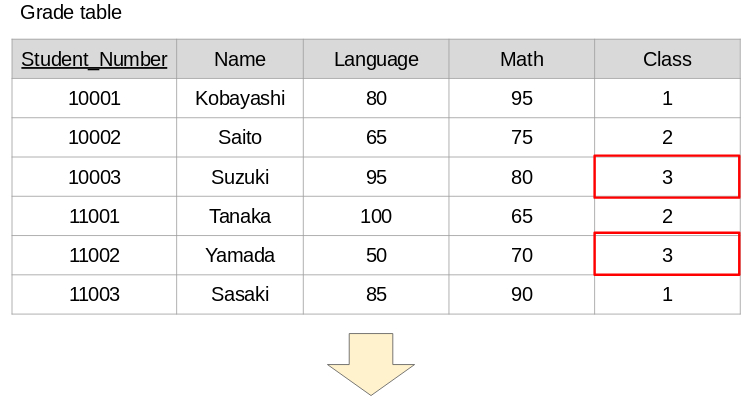
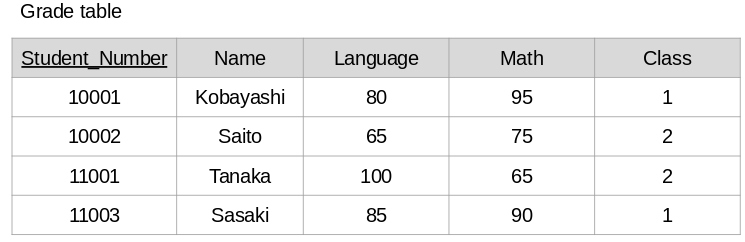
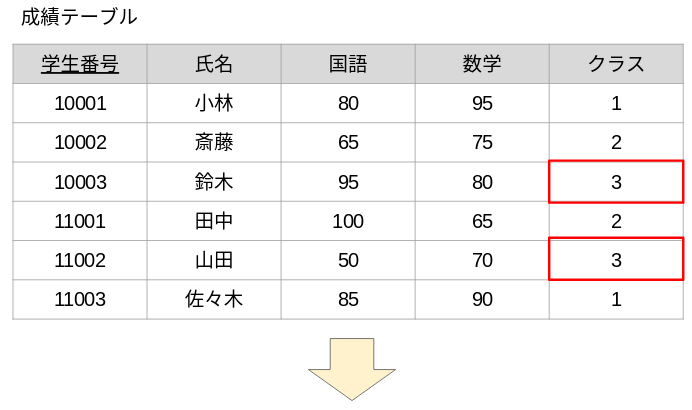
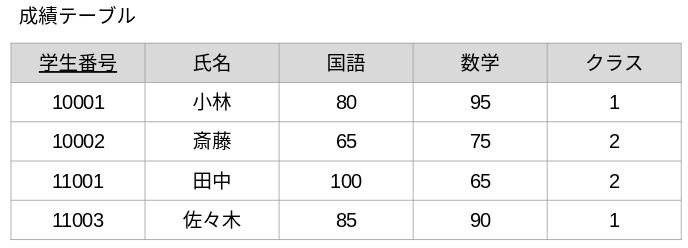
For example, the SQL for deleting the students with class 3 in the "Grade" table
is as follows.
DELETE FROM Grade WHERE Class = 3
[Japanese]
データベース上のテーブルにデータを挿入したり、更新、削除するときのSQLについて解説します。
(1)データの挿入
テーブルへデータを挿入するときは、SQLで「INSERT」を使用します。
INSERT INTO テーブル名(項目名, 項目名, ・・・)
VALUES(登録するデータ, 登録するデータ, ・・・)
テーブル名の後ろには、登録したいテーブルの項目名を全て記述します。
プライマリキーの項目名は必ず記述します。
VALUESの後ろには、登録したいデータを記述します。こちらもプライマリキーの項目には必ず登録したいデータを記述します。
(例)「成績」テーブルに、学生番号11003の学生を登録する場合
INSERT INTO 成績(学生番号, 氏名, 国語, 数学, クラス)
VALUES('11003', '佐々木', 85, 60, 1)
※ 学生番号や氏名はテーブルをCREATEしたときにCHAR型(= 文字型)で定義したため、VALUESの後ろに記述するときはシングルクォーテーション(')で囲む必要があります。国語や数学などはDECIMAL型(= 数値型)で定義したため、シングルクォーテーションは必要ありません。
(2)データの更新
テーブルのデータを更新するときは、SQLで「UPDATE」を使用します。
UPDATE テーブル名
SET 項目名 = 登録するデータ, 項目名 = 登録するデータ, ・・・
WHERE 条件
WHEREで指定した条件に合致する行の項目を更新します。複数の項目を更新することも可能です。また、WHEREを記述しない場合は、テーブルの全ての行が更新対象となります。
(例)「成績」テーブルの学生番号が11003の学生の数学を90点に更新する
場合
UPDATE 成績 SET 数学 = 90 WHERE 学生番号 = '11003'
(3)データの削除
テーブルの行(= データ)を削除するときは、SQLで「DELETE」を使用します。
DELETE FROM テーブル名 WHERE 条件
WHEREで指定した条件に合致する行が削除されます。WHEREを記述しない場合は、テーブルの全ての行が削除されますので、誤って全削除しないようにご注意ください。
(例)「成績」テーブルで、クラスが3の学生を削除する場合
DELETE FROM 成績 WHERE クラス = 3