Option Explicit
Option Base 0
'
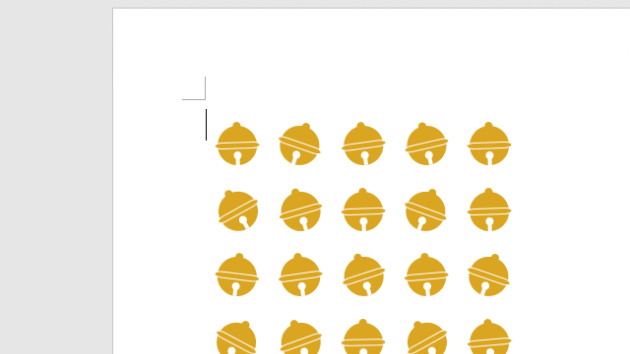
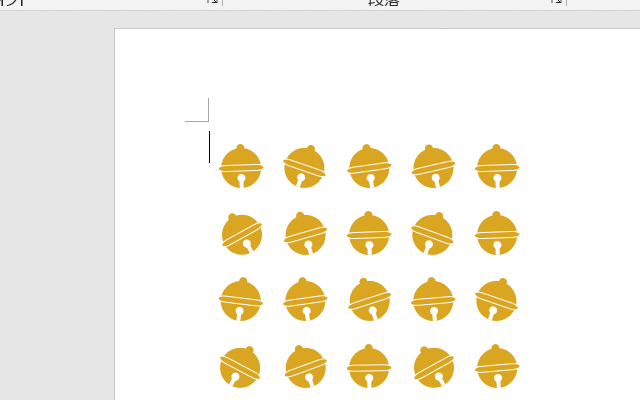
Public Sub 鈴描画マクロ()
Const BELLLEFT = 80 '描画開始位置X
Const BELLTOPP = 90 ' Y
'
Const BELLSWID = 30 '鈴描画幅
Const BELLSHEI = BELLSWID '鈴画高さ
'
Const BELLHSIZ = (BELLSWID * 0.2) '上部サイズ
Const BELLCSIZ = (BELLSWID * 0.15) '真ん中凸サイズ
Const BELLMSIZ = (BELLSWID * 0.2) '下部穴
Const DELLGWID = 3 '下部溝幅
'
Const BELLVSPC = 18 '横-間隔
Const BELLHSPC = 20 '縦-間隔
'
Const BELLCOLS = 5 '横/描画数
Const BELLROWS = 4 '縦/描画数
'
Const BELLLNWE = 0.5 '線の太さ
'---------------------------------------------------------------------------
Dim Ip As Integer, Jp As Integer
Dim intDxp As Integer, intDyp As Integer
Dim lngCol As Long, varNam(4) As Variant
'
Randomize '*乱数系列初期化
'
lngCol = RGB(218, 165, 32) '←塗りつぶし色
For Jp = 0 To BELLROWS - 1
intDyp = BELLTOPP + (BELLSHEI + BELLHSPC) * Jp
For Ip = 0 To BELLCOLS - 1
intDxp = BELLLEFT + (BELLSWID + BELLVSPC) * Ip
'*外形(円形)描画
With ActiveDocument.Shapes.AddShape( _
msoShapeOval, _
intDxp, intDyp, _
BELLSWID, BELLSHEI)
.Fill.Visible = msoTrue
.Fill.ForeColor.RGB = lngCol
.Line.Visible = msoFalse
varNam(0) = .Name
End With
'*頭部ポチ(円形)描画
With ActiveDocument.Shapes.AddShape( _
msoShapeOval, _
intDxp + BELLSWID / 2 - BELLHSIZ / 2, _
intDyp - BELLHSIZ / 2, _
BELLHSIZ, BELLHSIZ)
.Fill.Visible = msoTrue
.Fill.ForeColor.RGB = lngCol
.Line.Visible = msoFalse
varNam(1) = .Name
End With
'*真ん中凸(FC端子)描画
With ActiveDocument.Shapes.AddShape( _
msoShapeFlowchartTerminator, _
intDxp - BELLCSIZ / 2, _
intDyp + BELLSHEI / 2 - BELLCSIZ / 2, _
BELLSWID + BELLCSIZ, BELLCSIZ)
.Fill.Visible = msoTrue
.Fill.ForeColor.RGB = lngCol
.Line.Visible = msoTrue
.Line.ForeColor.RGB = vbWhite
.Line.Weight = BELLLNWE
varNam(2) = .Name
End With
'*下部穴(円形)描画
With ActiveDocument.Shapes.AddShape( _
msoShapeOval, _
intDxp + BELLSWID / 2 - BELLMSIZ / 2, _
intDyp + BELLSHEI * 0.75 - BELLMSIZ / 2, _
BELLMSIZ, BELLMSIZ)
.Fill.Visible = msoTrue
.Fill.ForeColor.RGB = vbWhite
.Line.Visible = msoFalse
varNam(3) = .Name
End With
'*下部溝(矩形)描画
With ActiveDocument.Shapes.AddShape( _
msoShapeRectangle, _
intDxp + BELLSWID / 2 - DELLGWID / 2, _
intDyp + BELLSHEI * 0.75, _
DELLGWID, BELLSHEI * 0.25)
.Fill.Visible = msoTrue
.Fill.ForeColor.RGB = vbWhite
.Line.Visible = msoFalse
varNam(4) = .Name
End With
'*描画部分をグループ化して、ランダムに傾ける
ActiveDocument.Shapes.Range(varNam).Group.Rotation = CInt(Rnd * 60) - 30
Next Ip
Next Jp
'*グループ化による選択解除
Selection.Collapse Direction:=wdCollapseEnd
End Sub