Option Explicit
Option Base 0
Public Sub 梅鉢文様描画マクロ()
Const PULMLEFT = 80 '描画開始位置X
Const PULMTOPP = 100 ' Y
'
Const PULMMRAD = 4 '真ん中●半径
Const PULMLRAD = 6 '真ん中○半径
Const PULMPRAD = 16 '花半径
Const PULMHRAD = 6 'まわり○半径
'
Const PULMROWS = 3 '描画数(行)
Const PULMCOLS = 4 '描画数(桁)
Const PULMROLN = 50 '縦方向間隔
Const PULMCOLN = 60 '横方向間隔
'---------------------------------------------------------------------------
Dim Ip As Integer, Jp As Integer, Kp As Integer
Dim intCxp As Integer, intCyp As Integer
Dim intPxp As Integer, intPyp As Integer
Dim lngCol As Long, dblRv As Double
'
lngCol = RGB(255, 105, 180) '←描画色
dblRv = ((4 * Atn(1)) / 180) * (360 / 5)
For Jp = 0 To PULMROWS - 1
intCyp = PULMTOPP + PULMROLN * Jp
For Ip = 0 To PULMCOLS - 1 - (Jp Mod 2)
intCxp = PULMTOPP + PULMCOLN * Ip _
+ (PULMCOLN \ 2) * (Jp Mod 2)
'*花びら描画
For Kp = 0 To 4
intPxp = PULMPRAD * Cos(dblRv * Kp - dblRv / 4) + intCxp
intPyp = PULMPRAD * Sin(dblRv * Kp - dblRv / 4) + intCyp
'
With ActiveDocument.Shapes.AddLine(intCxp, intCyp, _
intPxp, intPyp).Line
.ForeColor.RGB = lngCol
End With
With ActiveDocument.Shapes.AddShape(msoShapeOval, _
intPxp - PULMHRAD, intPyp - PULMHRAD, _
PULMHRAD * 2, PULMHRAD * 2)
.Fill.Visible = True '←塗りつぶし有無
.Fill.ForeColor = vbWhite
.Line.ForeColor.RGB = lngCol '←塗りつぶし色
.Line.Visible = True '←線の有無
End With
Next Kp
'*真ん中部分描画
With ActiveDocument.Shapes.AddShape(msoShapeOval, _
intCxp - PULMLRAD, intCyp - PULMLRAD, _
PULMLRAD * 2, PULMLRAD * 2)
.Fill.Visible = True '←塗りつぶし有無
.Fill.ForeColor = vbWhite
.Line.ForeColor.RGB = lngCol '←塗りつぶし色
.Line.Visible = True '←線の有無
End With
'
With ActiveDocument.Shapes.AddShape(msoShapeOval, _
intCxp - PULMMRAD, intCyp - PULMMRAD, _
PULMMRAD * 2, PULMMRAD * 2)
.Fill.ForeColor.RGB = lngCol '←塗りつぶし色
.Fill.Visible = True '←塗りつぶし有無
.Line.Visible = False '←線の有無
End With
Next Ip
Next Jp
End Sub
蛇足
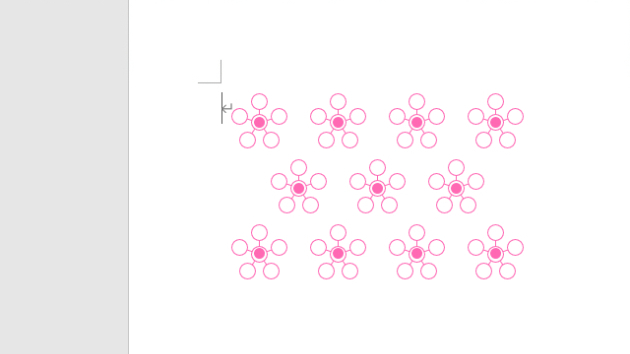
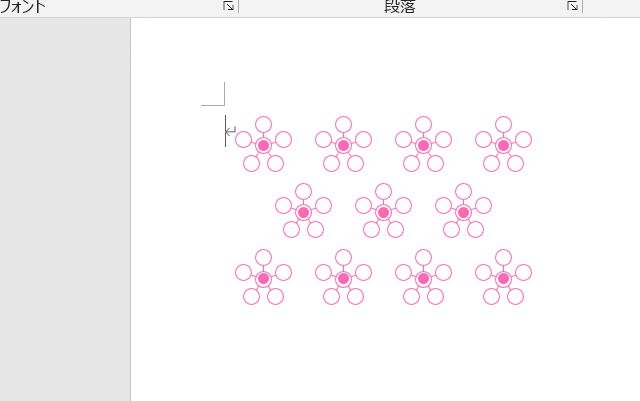
画像では、真ん中の●が一部ずれていますが、ワードの表示倍率を変える
と、直ります。なので、ワード自体の問題かと。