Option Explicit
Option Base 0
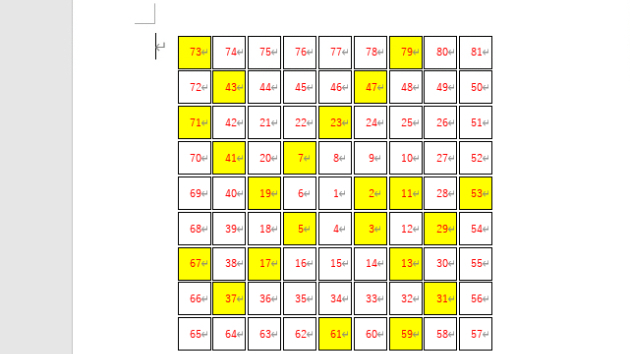
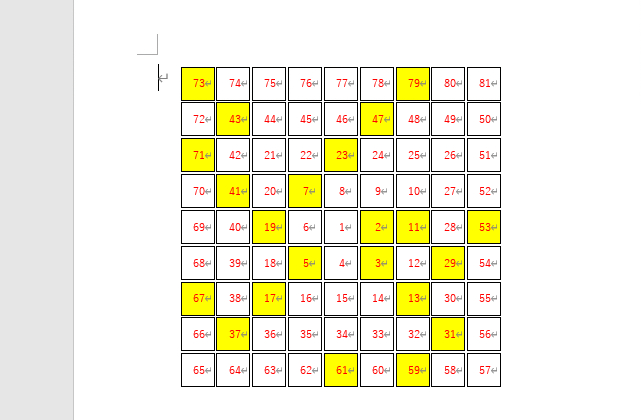
'☆素数が描く不思議な模様
Public Sub ウラムの螺旋模様描画マクロ()
Const BOXXLEFT = 90 '起点位置 X
Const BOXXTOPP = 80 ' Y
Const BOXXWIDT = 30 'ボックスの幅
Const BOXXHEIG = 30 'ボックスの高さ
Const BOXXSPAC = 2 '隙間間隔
Const BOXXCONT = 9 '縦横列数
Const NUMFNTSZ = 9 '番号フォントサイズ
Const NUMFNTNA = "MS ゴシック" '名前
'---------------------------------------------------------------------------
Dim Ip As Integer, Jp As Integer, Kp As Integer
Dim intXp As Integer, intYp As Integer
Dim intDw As Integer
Dim intMat(BOXXCONT - 1, BOXXCONT - 1) As Integer
Dim blnPrm(BOXXCONT - 1, BOXXCONT - 1) As Boolean
'
'*数字テーブル初期設定
For Jp = 0 To BOXXCONT - 1
For Ip = 0 To BOXXCONT - 1
intMat(Ip, Jp) = 0: blnPrm(Ip, Jp) = False
Next Ip
Next Jp
'
'*渦巻状の数字を並べて、素数チェック
Kp = 1: intDw = 0
intXp = (BOXXCONT \ 2) + 0: intYp = (BOXXCONT \ 2) + 0
Do
intMat(intXp, intYp) = Kp
blnPrm(intXp, intYp) = 素数チェック(Kp)
Kp = Kp + 1
If Kp > BOXXCONT * BOXXCONT Then Exit Do
Select Case intDw
Case 0: intXp = intXp + 1 '*→
If intYp < BOXXCONT - 1 Then
If intMat(intXp, intYp + 1) = 0 Then intDw = 2
End If
Case 1: intXp = intXp - 1 '*←
If intYp > 0 Then
If intMat(intXp, intYp - 1) = 0 Then intDw = 3
End If
Case 2: intYp = intYp + 1 '*↓
If intXp > 0 Then
If intMat(intXp - 1, intYp) = 0 Then intDw = 1
End If
Case 3: intYp = intYp - 1 '*↑
If intXp < BOXXCONT - 1 Then
If intMat(intXp + 1, intYp) = 0 Then intDw = 0
End If
End Select
Loop While True
'
For Jp = 0 To BOXXCONT - 1
intYp = BOXXTOPP + BOXXHEIG * Jp
For Ip = 0 To BOXXCONT - 1
intXp = BOXXLEFT + BOXXWIDT * Ip
With ActiveDocument.Shapes.AddShape( _
msoShapeRectangle, intXp, intYp, _
BOXXWIDT - BOXXSPAC, _
BOXXHEIG - BOXXSPAC)
.Fill.ForeColor = _
IIf(blnPrm(Ip, Jp) = True, vbYellow, vbWhite)
.Fill.Visible = True
.Line.ForeColor.RGB = vbBlack
.Line.Visible = True
'
.TextFrame.TextRange.Text = Str(intMat(Ip, Jp))
.TextFrame.TextRange.Font.ColorIndex = wdRed
.TextFrame.TextRange.Font.Size = NUMFNTSZ
.TextFrame.TextRange.Font.Name = NUMFNTNA
End With
Next Ip
Next Jp
End Sub
'
Public Function 素数チェック(pintNum As Integer) As Boolean
Dim Ip As Integer
'
If pintNum < 2 Then 素数チェック = False: Exit Function
If pintNum = 2 Then 素数チェック = True: Exit Function
'
If (pintNum Mod 2) = 0 Then '*偶数?
素数チェック = False: Exit Function
End If
'
素数チェック = True
For Ip = 3 To CInt(Sqr(pintNum)) Step 2
If (pintNum Mod Ip) = 0 Then
素数チェック = False: Exit For
End If
Next Ip
End Function